A good serve biomechanics report does not drown a player in numbers. It shows, stage by stage, where the serve builds speed, where the chain breaks, and which two or three changes will matter most in the next training block.
I am Geoffroy Dupuis, founder of JuniorToPro, and I work as an independent high-performance coach with players on the ITF Junior Tour, the ITF World Tennis Tour and the WTA. The serve is the only shot in tennis the player fully controls, and it is also the stroke that places the most repeated stress on the shoulder and the elbow. That is why I analyse it with J2Pro Motion, the biomechanics tool I use in my coaching work. This article explains, section by section, what a serve biomechanics report shows and how to read it as a player or a parent.
What is a serve biomechanics report?
A serve biomechanics report is a structured analysis of a slow-motion serve video. It breaks the serve into its successive stages, measures the key positions and timings, and translates those measurements into strengths, priorities and concrete targets for training.
The simplest way to understand it is to think of the serve as cracking a whip. The power does not start in the arm; it starts in the handle — the legs and the hips — and travels through the trunk and the shoulder to the tip, which is the racket. When one link of the chain is late or missing, the arm has to compensate, and the shoulder usually pays the bill. A biomechanics report shows where the chain works and where it breaks, so that the work on court targets the cause rather than the symptom.
Which model does the report use?
J2Pro Motion follows the 8-stage serve model of Kovacs & Ellenbecker, a reference framework in tennis science. The eight stages are grouped into three phases:
- Preparation: 1. Start (stance, balance, rhythm), 2. Toss (ball release, arm path, toss placement), 3. Loading · Trophy (knee bend, shoulder tilt, trophy position), 4. Cocking (racket drop and external rotation of the shoulder).
- Acceleration: 5. Acceleration (leg drive, trunk rotation, arm extension), 6. Contact (contact height, body angle, extension).
- Follow-through: 7. Deceleration (how the arm and trunk slow the racket down), 8. Finish (landing, balance and recovery for the next ball).
A recognised model gives the player, the family and the staff a shared language: “stage 4” means the racket drop, for everyone.
Why are some stages anchored by the coach?
Three stages — 3 (Loading · Trophy), 4 (Cocking) and 6 (Contact) — are anchored by the coach directly on the video. In other words, I mark the exact frame of each of these key positions myself, and the tool builds its measurements around them.
This is a deliberate choice. A report is only useful if it is honest about what the camera can really see. Anchoring the key positions by hand keeps the analysis objective and avoids guesswork: the report states what the video shows, nothing more.
What does each section of the report show?
A J2Pro Motion report contains eight sections. Each one is linked to the scientific reference it draws on, so everyone can see why a priority matters.
1. Serve overview
The eight stages on the player’s own video, with the key frames. This is the “map” of the serve and the first page parents usually look at.
2. Footwork and trophy-position load
Stance, knee bend and the load placed on the shoulder at the trophy position, read in the light of the work of Martin on serve mechanics and upper-limb stress. This section links performance and prevention: it helps protect young players while they build serve speed.
3. Lower-body chain
How the legs and hips start the chain, with reference to Genevois and Reid. If the legs push too early, too late or not at all, the energy that should travel upwards is lost before it reaches the trunk.
4. Upper-body chain
Trunk, shoulder and arm timing up to contact, drawing on Matsuo and Hernández-Davó. Here we look at sequencing: does each segment accelerate in the right order, like the carriages of a train pulled one after the other, or do they all start at once?
5. Metrics table
Angles and timings, with the mean and the spread over 3 to 5 serves. This table is the evidence behind the conclusions.
6. Strengths and priorities
What to keep, and the two or three changes that matter most. I deliberately limit the list: a player who tries to change seven things at once usually changes nothing.
7. Session outcomes
Concrete targets for the next training sessions — what we will actually do on court and in the gym.
8. Setup notes
The camera view and frame rate used, and what a side, front or back view can and cannot measure. This section keeps the report honest about its own limits.
Why analyse 3 to 5 serves instead of one?
One beautiful serve proves very little. Every player can produce a perfect repetition now and then; what wins matches is the serve that comes back under pressure at 4–4 in the third set. That is why J2Pro Motion produces a consistency report over three to five serves, showing the mean and the spread of each measurement.
Parents can read the spread as the “reliability” of a movement. A small spread means the movement is stable and automated. A large spread means the player is still searching, and that stage is a natural candidate for training. A technical change only counts when it holds across repetitions — not when it appears once on a good day.
How is the serve filmed for a biomechanics report?
The setup is deliberately simple, because the best analysis is the one we can repeat regularly, in Montpellier or on tour:
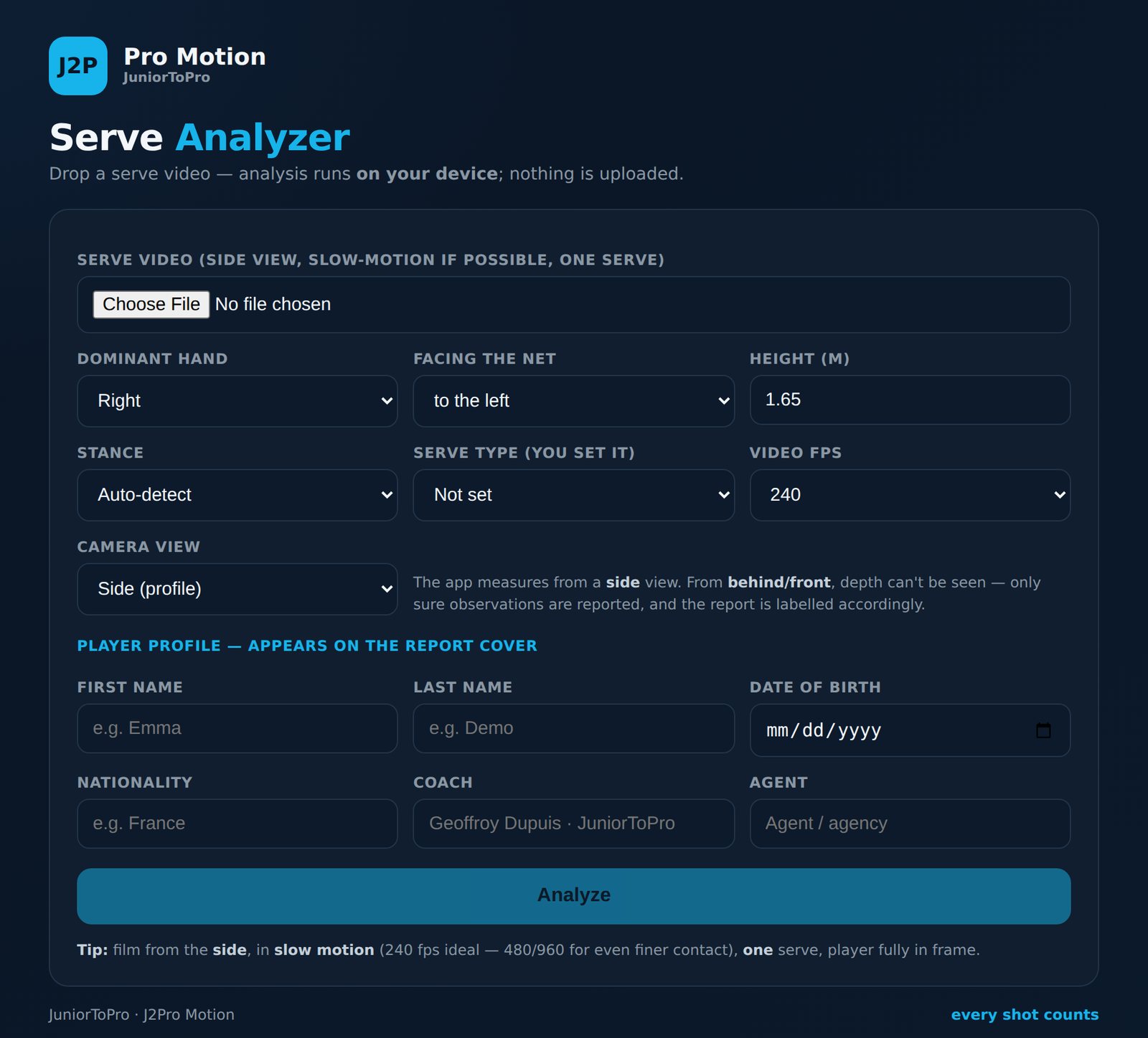
- Film from the side, with the player fully in frame — this is the view that gives the most information.
- Use slow motion: the tool accepts footage from 30 to 960 fps; 240 fps is ideal, and 480–960 fps gives an even finer view of contact.
- One serve per video, and three to five videos for the consistency report.
- The analyser asks for the player’s dominant hand, height, stance, serve type and frame rate, and adapts the report to the camera view.
- Optional extras: a scale calibration, and a Baseline Vision session summary to add the ball-tracking context of the session.
Privacy is part of the design: the video is analysed on the device, and nothing is uploaded. For families of junior players, that is an important point.
What a serve biomechanics report does not show
It is just as important to be clear about the limits. J2Pro Motion analyses a two-dimensional video from a known camera angle; it is not a 3D motion-capture laboratory, and the report says so in its setup notes. A side view reads knee bend, trunk inclination and contact height very well, but it cannot measure everything that happens across the body. The report is also not a medical assessment: if a player has shoulder or elbow pain, the priority is a physiotherapist or a doctor, not a technical change.
Used within these limits, the report is a precise tool. It tells us where to look, and it gives us a baseline to measure progress against. For the wider picture of how I use biomechanics across all strokes and movement, see our tennis biomechanics pillar page.
What happens after the report?
A report is only the beginning. The priorities become measurable goals in the player’s J2Pro Circuit app, the physical work is supported with Kinvent tools (K-Plates, K-Move, K-Grip), and a new analysis a few weeks later confirms whether the change holds. I describe that full process in the companion article, “From video to a technical plan”.
Read next: all J2Pro Motion articles.
Frequently asked questions
What does a tennis serve biomechanics report measure?
It measures the key positions and timings of the serve across the 8 stages of the Kovacs & Ellenbecker model — stance, toss, trophy position, racket drop, leg drive, trunk rotation, contact and finish — and reports angles and timings with their mean and spread over 3 to 5 serves.
Can I film the serve with a phone?
Yes. A phone filming in slow motion from the side is enough. J2Pro Motion accepts footage from 30 to 960 fps, with 240 fps as the ideal setting and 480–960 fps for a finer view of contact.
Is the video uploaded to a server?
No. J2Pro Motion analyses the video on the device, and nothing is uploaded, which keeps a junior player’s footage private.
How many serves are needed for a reliable analysis?
Three to five serves, one per video. The consistency report compares them and shows the mean and the spread, because a technical change only counts when it holds across repetitions.
Can a biomechanics report prevent shoulder injuries?
It can highlight positions associated with higher shoulder and elbow load, such as at the trophy position, and guide technical and physical work. It does not replace a medical assessment: any pain should be checked by a physiotherapist or doctor.
Book a serve analysis
Want to see what your serve really looks like, stage by stage? Discover J2Pro Motion, or book a call to plan a serve analysis in Montpellier or on tour.